
A commercial claw machine may look mechanically simple, but reliable operation depends on several systems working together: the gantry, claw assembly, cable or rope, motors, limit switches, payment hardware, sensors, control board, lighting, power supply, and prize configuration.
That is why commercial claw machine maintenance should focus on preventing small inconsistencies from becoming machine-stopping faults. A joystick that occasionally misses one direction, a cable beginning to fray, a dirty payment sensor, or a misaligned home switch may initially seem minor. In a busy arcade or family entertainment center, however, the same issue can eventually leave the machine unavailable during peak traffic.
The most effective maintenance program combines frequent functional checks with condition-based servicing, proper spare-parts planning, clear records, and fast access to technical support.
1.Why Commercial Claw Machine Maintenance Matters
Preventive maintenance has three practical objectives: keep the machine available, maintain a consistent player experience, and identify wear before it causes secondary damage.
A useful maintenance check therefore goes beyond asking, “Does the machine turn on?” Staff should confirm the complete customer journey:
- Does the payment method create the correct credit?
- Does the joystick move the gantry correctly?
- Can the claw reach the expected play area?
- Does the claw descend and close normally?
- Does it return to its home position?
- Does the prize chute or win sensor register correctly?
- Do the lights, display, audio, and other player-facing functions operate normally?
Industry preventive-maintenance guidance specifically recommends regular play testing because it checks several subsystems together rather than inspecting components in isolation.
For operators, this is important because intermittent problems are often easiest to correct before the machine stops completely.
2.Build a Maintenance Schedule Around Usage
There is no single maintenance interval that fits every commercial claw machine.
A machine operating all day in a high-traffic mall may require more frequent attention than the same model in a lightly used entertainment area. Dust, humidity, operating hours, prize fibers, food residue, customer handling, and payment type can all change the maintenance workload.
Fleet-maintenance guidance therefore recommends combining routine checks with condition-based maintenance and the instructions for the specific machine.
A practical starting framework is:
| Frequency | Recommended Checks | Main Goal |
|---|---|---|
| Daily / before opening |
Cabinet, glass, prize chute, payment, controls, lighting, test play |
Catch customer-facing faults |
| Weekly |
Claw, cable, gantry travel, switches, belts, unusual noise, fasteners |
Detect mechanical wear |
| Monthly / condition-based |
Internal cleanliness, connectors, payment components, sensors, PSU condition, service history |
Prevent intermittent failures |
| Periodically per manual |
Lubrication, motor/gear inspection, deeper electrical inspection, replacement of wear parts |
Long-term reliability |
| After any major repair |
Full test cycle and configuration verification |
Confirm correct restoration |
The schedule should become more frequent when inspection records show recurring problems.
Do not lubricate a rail, gear, bearing, or other mechanism simply because it moves. Use only the lubricant and procedure specified for that machine. Some components are designed to operate differently, and excess lubricant can attract dirt.
3.Daily Checks Before Opening
Daily maintenance should be simple enough that front-line staff can complete it consistently.
Clean the player-facing surfaces
Remove fingerprints and dust from glass or acrylic panels. Wipe the joystick, buttons, payment area, prize door, and other high-touch surfaces using materials suitable for the cabinet finish.
Also inspect the prize compartment for loose tags, packaging, threads, or objects that could enter the claw mechanism.
Check the prize chute
Make sure the chute is empty and the prize door returns freely. A blocked or sticky chute can create customer complaints even when the claw mechanism itself works correctly.
Test the payment path
Use the same process a customer uses.
If the machine accepts coins, verify that a normal coin or token registers correctly. For card or QR-based systems, confirm the reader is online and that the correct number of credits is added.
Run a complete test game
Move the claw in every available direction and listen for abnormal clicking, grinding, or vibration. Drop the claw and observe the entire cycle until it returns to its starting position.
A weekly industry procedure recommended by amusement technical specialists similarly tests payment, joystick/gantry movement, claw closing, prize lifting, and prize-counting behavior as one complete sequence.
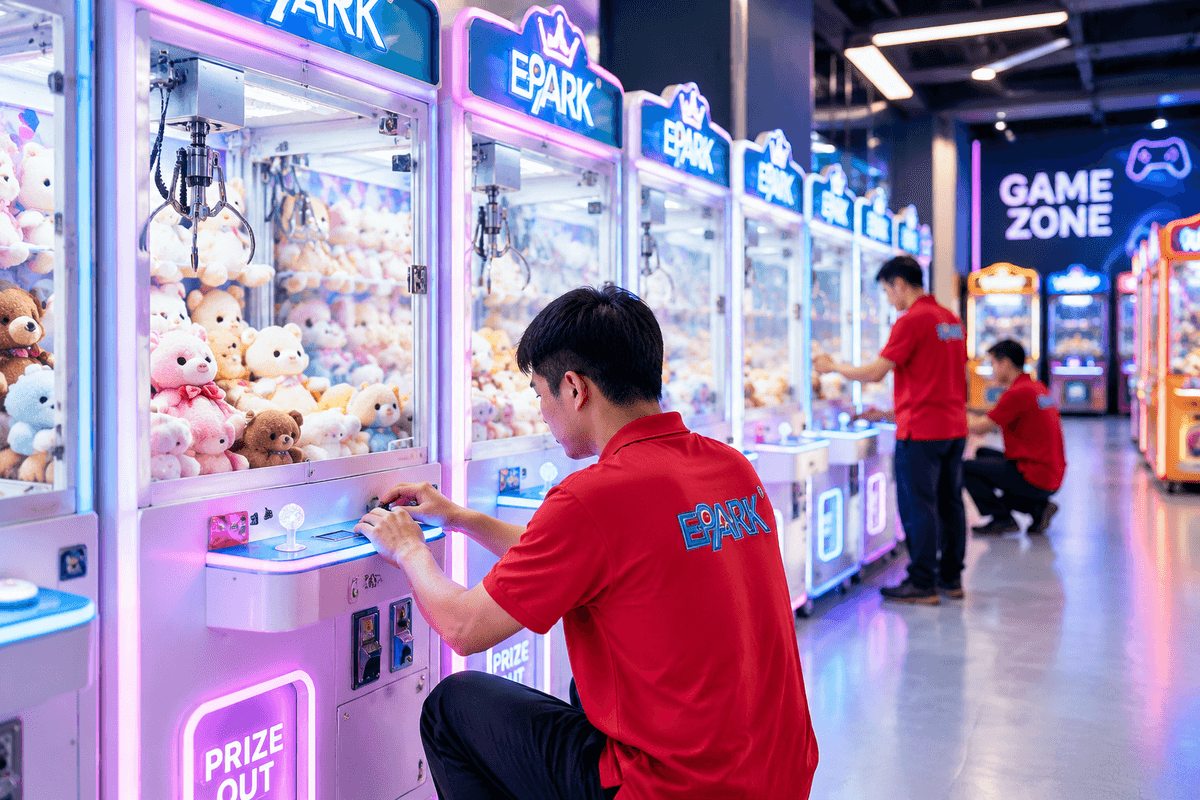
4.Maintain the Claw, Gantry, Cable, and Rails
Mechanical wear is especially important because the claw carriage repeats the same movement thousands of times over its operating life.
Inspect the claw cable or rope
Look along the accessible length for:
- fraying
- kinks
- dirt buildup
- unusual twisting
- incorrect winding
- abrasion around pulleys
Technical crane-maintenance guidance warns that incorrect string routing or deteriorated string can cause abnormal claw behavior and recommends replacement rather than tying knots into damaged sections.
Keep the correct replacement cable or rope for each machine model in stock.
Check gantry movement
Move the carriage through its normal range. It should travel smoothly without binding, excessive vibration, or abnormal noise.
Inspect accessible belts, rollers, gears, pulleys, and rail fasteners. Worn drive components can cause poor positioning or a gantry that becomes stuck.
Inspect limit and home switches
Limit switches tell the control system where movement should stop.
A failed or misaligned switch can produce symptoms that look like motor or controller problems—for example, failure to return home or a motor continuing to run after reaching the end of travel. Industry technical guidance specifically identifies limit switches as a potential cause of apparent motor errors.
Look for loose hardware
Repeated motor movement creates vibration. Check accessible screws, brackets, claw fasteners, switch mounts, and related hardware for movement.
Avoid indiscriminately overtightening components. Follow the manufacturer’s torque and fastening recommendations, especially around plastic or lightweight brackets.
5.Check Payment, Controls, Sensors, and Electrical Systems
Not every downtime event originates in the claw mechanism.
Payment systems
Commercial machines may be configured for coins, membership cards, or QR-based payment systems. EPARK’s company information indicates support for these different payment configurations, which means operators should include the actual installed payment interface in their maintenance SOP rather than using a coin-only checklist.
Typical checks include:
- coin or token acceptance
- coin-path cleanliness
- payment-reader communication
- credit signal
- cables and connectors
- account/network status for applicable cashless systems
Joystick and buttons
A worn microswitch can produce an intermittent direction before failing completely.
If the machine occasionally ignores one joystick direction, record which direction fails and whether the problem occurs continuously or intermittently. This narrows troubleshooting considerably.
Sensors
Optical sensors should remain clean and correctly aligned. Technical maintenance guidance notes that sensor problems can affect position detection, coin counting, or prize detection depending on the machine design.
Power and electrical connections
Look for visible cable damage, loose connectors, discoloration, unusual smell, or unexpected heat. Never install a larger fuse than the manufacturer specifies simply because a fuse repeatedly opens; repeated fuse failure indicates another problem that requires diagnosis.
For U.S. workplaces, servicing that could expose employees to unexpected energization may fall under OSHA hazardous-energy-control requirements. OSHA requires applicable equipment to be isolated and rendered safe before covered servicing work, with specific procedures for situations where temporary energization is required for testing. Operators in other countries should follow the equivalent local safety requirements.
OSHA guidance on controlling hazardous energy during servicing
Live electrical diagnosis or work inside energized equipment should be handled only by appropriately qualified personnel.
6.Troubleshoot Common Claw Machine Problems
Good troubleshooting follows a sequence. Start with the simplest observable cause before replacing major assemblies.
| Symptom | Check First | Then Investigate |
|---|---|---|
| Machine has no power | Outlet, main switch, cord, specified fuse/breaker | PSU, wiring, internal electrical fault |
| Payment accepted but no game starts | Credit signal and payment wiring | Input settings, control board |
| Joystick direction does not work | Joystick switch and connector | Harness, limit switch, controller output |
| Claw does not travel smoothly | Rail obstruction and mechanical binding | Belt/gear wear, motor, alignment |
| Claw drops but does not close | Claw wiring/mechanism | Output circuit, motor/solenoid where applicable |
| Grip feels inconsistent | Prize setup and claw condition | Configuration, connection, PSU performance |
| Gantry will not return home | Obstruction and home/limit switch | Switch wiring, motor drive, control board |
| Machine resets during movement | Loose power connection | PSU under load, wiring, overheating, board fault |
| Coin/token rejected | Blockage or contamination | Calibration/configuration, wiring, acceptor failure |
| Prize not detected | Chute blockage or sensor contamination | Sensor alignment, wiring, configuration |
Avoid changing several settings simultaneously. If three parameters are changed at once and the fault disappears, technicians no longer know which change solved it—and the same issue becomes harder to diagnose later.
Record the original configuration before adjustment.
7. Prize Setup and Calibration Can Prevent False Faults
A machine can be mechanically healthy and still feel unreliable when the prize program does not match the claw setup.
Oversized plush, densely packed prizes, tangled tags, irregular packaging, or prizes pressed against the cabinet may restrict access. Operators sometimes respond by adjusting claw strength when the real problem is merchandise presentation.
A better sequence is:
- Confirm the mechanism works correctly with an appropriate test object.
- Check whether prize size suits the claw opening and cabinet.
- Make sure merchandise does not interfere with carriage travel.
- Arrange enough clearance for prizes to move naturally.
- Verify gameplay after each major prize change.
- Only then review permitted configuration settings.
This distinction matters because maintenance and payout configuration are not the same task. Settings should follow the machine documentation, the operator’s intended gameplay, and applicable local requirements.
From a supplier perspective, prize type should ideally be discussed during machine selection. A cabinet intended for small capsules may require a different claw and setup from one used for larger plush.
8. Stock Spare Parts to Reduce Repair Waiting Time
A preventable source of downtime is not the repair itself—it is waiting several days for a low-cost component.
The ideal spare-parts inventory depends on fleet size, installed machine models, previous failures, supplier lead times, and the criticality of each part. Fleet maintenance guidance recommends basing stocking decisions on those factors rather than assuming every component needs a spare.
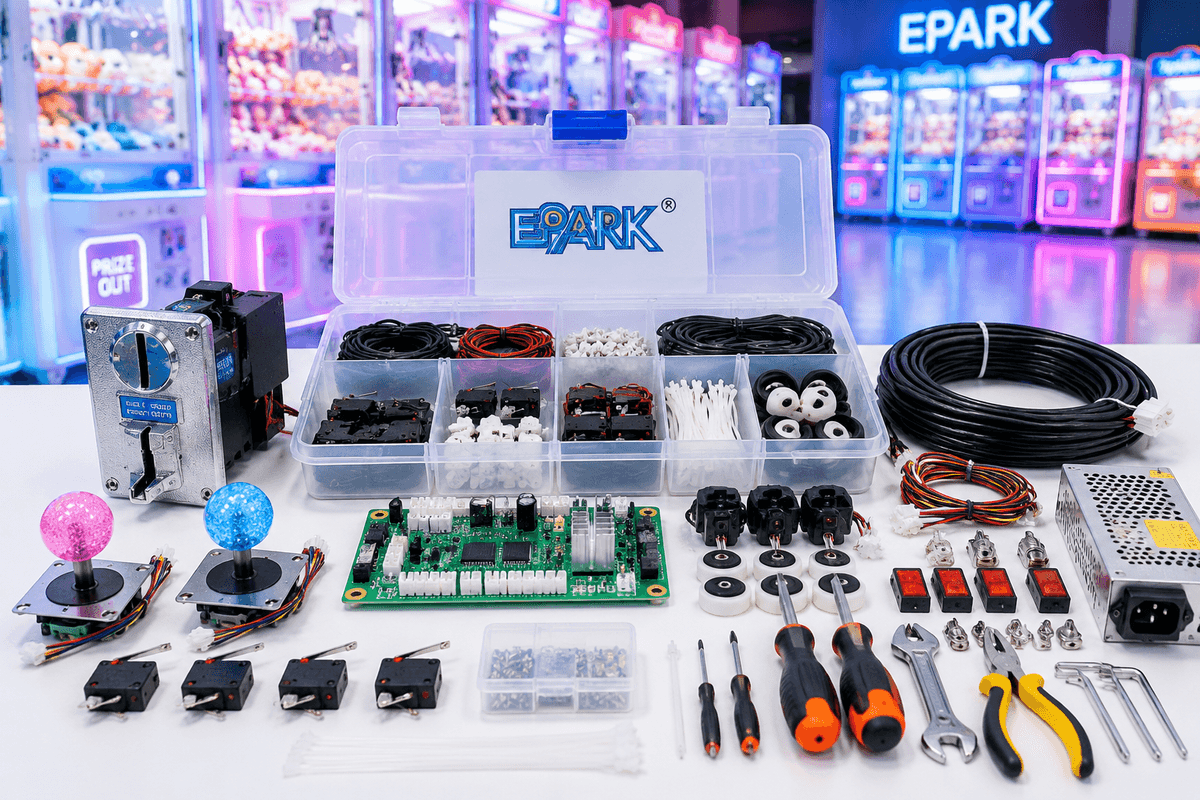
For a claw-machine fleet, consider keeping model-appropriate versions of frequently serviced items such as:
- claw cables or ropes
- microswitches
- buttons and joystick switches
- approved fuses
- commonly used belts or drive components
- claw hardware
- LED or lighting components
- payment-system parts
- selected sensors
- model-specific connectors or harnesses
A technician service kit may also include basic hand tools, cleaning materials, a multimeter for qualified staff, labels, cable ties, spare fasteners, and the machine documentation.
For multi-site operations, standardizing several machines around common components can simplify inventory significantly.
9. Supplier Perspective: Design for Maintainability
Maintenance efficiency begins before a machine is purchased.
A buyer evaluating commercial claw machines should ask not only about cabinet appearance and gameplay, but also about service access.
Useful procurement questions include:
- Can common wear components be accessed without dismantling the entire cabinet?
- Is a wiring diagram or service manual available?
- Are component labels clear?
- Which spare parts are model-specific?
- Can replacement components be shipped separately?
- What information does technical support require for diagnosis?
- Are operating parameters backed up or documented?
- Can payment systems be configured for the destination market?
- Does the electrical configuration match local voltage and plug requirements?
- What certification documentation is available for the specific model and destination?
EPARK manufactures commercial amusement equipment including claw and prize machines and provides OEM/ODM, venue planning, equipment configuration, installation-related services, and after-sales technical support. Its supplied company profile also states that configurations can support coin, membership-card, and QR payment methods as well as 110 V/220 V and different plug standards for international projects. Certification availability should be confirmed for the specific model and target market rather than assumed universally.
For operators purchasing multiple machines, this supplier relationship matters during maintenance. A short video showing the fault, the machine model, an error code, and a photo of the affected assembly can be far more useful than a message saying only “the claw does not work.”
Technical maintenance guidance likewise recommends keeping photos, videos, and maintenance records when requesting professional troubleshooting.
Internal-link placement for CMS: use the anchor “commercial prize machine options” here and connect it to EPARK’s claw machine category page when the final website URL is available.
10. Commercial Claw Machine Maintenance FAQ
How often should a commercial claw machine be maintained?
Use daily operational checks plus scheduled mechanical inspections, but adjust frequency according to traffic, operating hours, environment, observed condition, and the manufacturer’s instructions. There is no universal interval appropriate for every cabinet.
What should staff check every day?
Check cleanliness, the prize chute, payment acceptance, joystick and buttons, lighting, error indications, prize placement, and one complete game cycle.
Why does a claw machine suddenly stop moving in one direction?
Possible causes include a worn joystick microswitch, loose connector, damaged harness, misaligned limit switch, mechanical obstruction, motor problem, or control-board output fault. Start with controls and accessible connections before replacing major components.
Why is the claw suddenly weak?
First determine whether anything actually changed mechanically. Prize density, prize size, cable condition, claw wear, configuration, connections, or power-supply performance can all affect the result. Do not automatically increase claw power without identifying the cause.
Should I lubricate claw machine rails regularly?
Follow the instructions for the specific model. Some mechanisms need periodic lubrication, but the lubricant type, location, and interval should come from the manufacturer. Excess or unsuitable lubricant may attract dirt or damage materials.
Which spare parts are worth keeping on-site?
Prioritize inexpensive parts that commonly wear, have meaningful supplier lead times, and can stop the machine when they fail. For many fleets this may include claw cables, switches, controls, specified fuses, selected drive components, sensors, and payment-system parts.
What information should I send the supplier when a machine fails?
Send the exact model, serial or identifying information if available, description of the symptom, when it occurs, error codes, recent changes, photos or video, and steps already tested. A maintenance log can further shorten diagnosis time.
Can venue staff repair the electrical system themselves?
Routine visual inspections and manufacturer-approved operator tasks may be assigned to trained staff. Work exposing employees to electrical or other hazardous energy should follow applicable workplace safety requirements and be performed by qualified personnel where required.
11. Conclusion: Turn Maintenance Into an Uptime System
Reducing claw machine downtime is less about becoming better at emergency repairs and more about making faults visible early.
A strong commercial claw machine maintenance program combines daily play testing, scheduled mechanical checks, clean payment and sensor systems, correct prize setup, service documentation, model-specific spare parts, and a clear escalation process.
For a single machine, that process makes maintenance more predictable. For an arcade or FEC operating dozens of cabinets, it becomes an operating system: every machine has a checklist, service history, known spare parts, documented configuration, and defined support path.
When sourcing new equipment, include maintainability in the specification alongside appearance, gameplay, payment configuration, voltage, and prize type. EPARK can support claw-machine procurement as part of a wider commercial arcade or FEC project, including equipment configuration, customization, venue planning, and technical after-sales support.
FAQ
1. How long does routine claw machine maintenance take?
Basic daily checks can usually be completed quickly because they mainly involve cleaning, payment testing, control testing, prize-chute inspection, and one complete test game. More detailed mechanical or electrical inspections may require additional time depending on the machine condition.
2. How do I know when a claw machine cable needs replacement?
Replace the cable or rope when you notice fraying, kinks, unusual twisting, abrasion, incorrect winding, or visible deterioration. Damaged cable should be replaced rather than temporarily repaired with knots.
3. What causes unusual noise during claw machine operation?
Grinding, clicking, vibration, or other abnormal sounds may come from worn belts, gears, rollers, pulleys, loose fasteners, rail obstructions, alignment problems, or motor-related issues. Inspect the mechanical system before the problem becomes more serious.
4. How should claw machine sensors be cleaned?
Keep optical sensors clean and correctly aligned using cleaning methods suitable for the specific machine. Avoid damaging or repositioning the sensor during cleaning, and always follow the manufacturer’s maintenance instructions.
5. Why does a claw machine restart during gameplay?
Unexpected resets may be related to loose power connections, power-supply problems under load, wiring faults, overheating, or control-board issues. The power system and electrical connections should be checked systematically.
6. Can prize size affect claw machine performance?
Yes. Oversized, tightly packed, tangled, or unsuitable prizes can restrict claw movement and make the machine appear to have a mechanical or grip-strength problem. Prize size and arrangement should match the claw and cabinet design.
7. Should I keep a maintenance record for every claw machine?
Yes. Recording faults, repairs, replaced parts, configuration changes, and recurring issues makes future troubleshooting easier and helps operators identify machines that require more frequent inspection.
8. When should I contact the claw machine supplier for technical support?
Contact the supplier when routine troubleshooting does not identify the cause, when specialized replacement parts are required, or when electrical or control-system problems need professional diagnosis. Sending photos, videos, model information, and error details can speed up support.
9. How can arcade operators reduce downtime across multiple claw machines?
Use standardized maintenance checklists, keep service records, stock commonly used spare parts, train staff to identify early warning signs, and maintain a clear technical-support process for every machine model.
10. What should be checked after replacing a claw machine part?
After a repair or component replacement, run a complete test cycle. Confirm payment, controls, claw movement, prize detection, return-to-home operation, lighting, and other customer-facing functions before returning the machine to normal operation.
